Communication
Announcement Bar
Show one promotion, shipping update or important message at the top of your store.
Currently in development
11+ boosters, one built-in dashboard, and practical recommendations to help you spot what needs attention — without juggling a stack of separate apps.
Works inside ShopifyManage your boosters from one app.
Simple no-code setupGet started with built-in controls.
Built-in customizationAdjust each tool to fit your store.
One place for your toolsKeep the everyday controls together.
11+ BOOSTERS AND GROWING
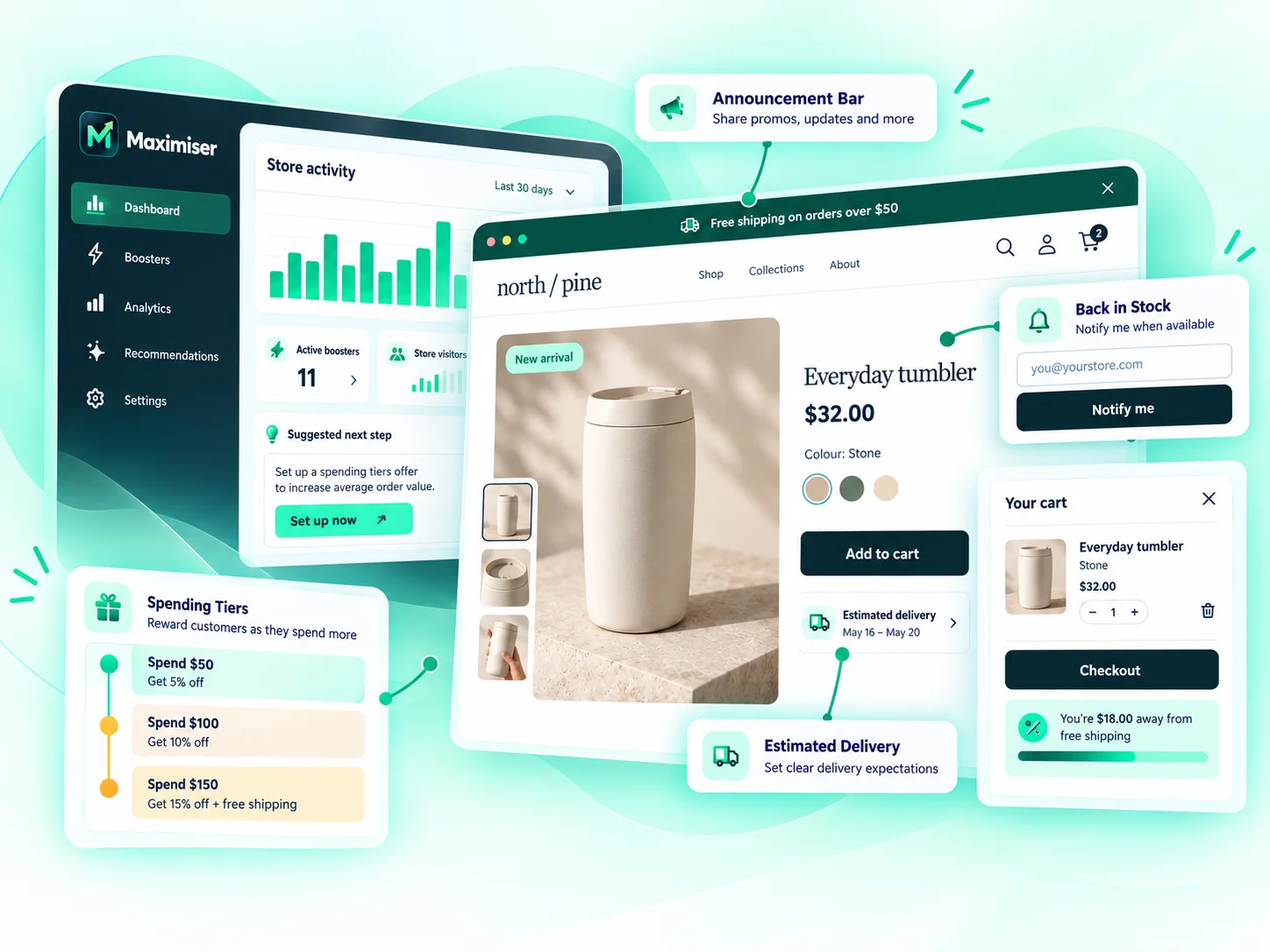
Add the tools your store needs without stacking up separate apps. Turn on what makes sense for your shop, customize it, and keep everything together in Maximiser.
Show one promotion, shipping update or important message at the top of your store.
Show shoppers an estimated delivery date or range on a product page before they buy.
Show the exact quantity when a selected product variant is genuinely running low.
Highlight a real sale or add one store-written label to a product page.
Show up to three complementary products selected in Shopify beside the item being viewed.
Show how close the current cart is to a spending milestone you set.
Bring one store message into focus after a desktop exit signal or an optional mobile delay.
Help shoppers return to products they viewed earlier in the same browser.
Let shoppers confirm an email request for an unavailable product variant.
Keep a compatible product-page purchase action within reach while shoppers scroll.
Let shoppers review their current cart in a read-only panel without leaving the page.
Maximiser is still growing.
More useful conversion tools are on the way.
INSIGHTS & GUIDANCE
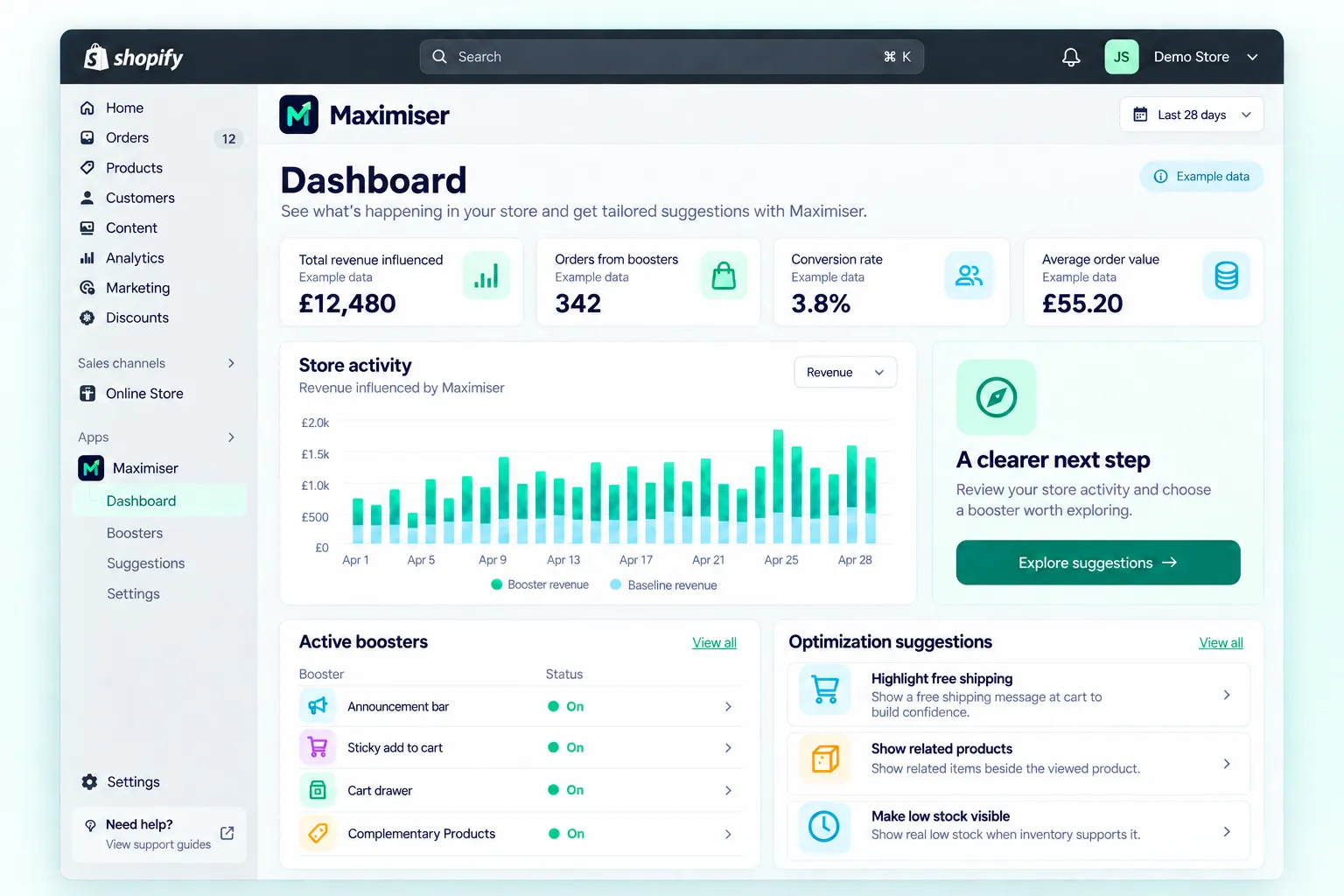
Maximiser gives you a clear view of what’s happening in your store, and shows you exactly what to do next — right inside Shopify.
SET UP YOUR WAY
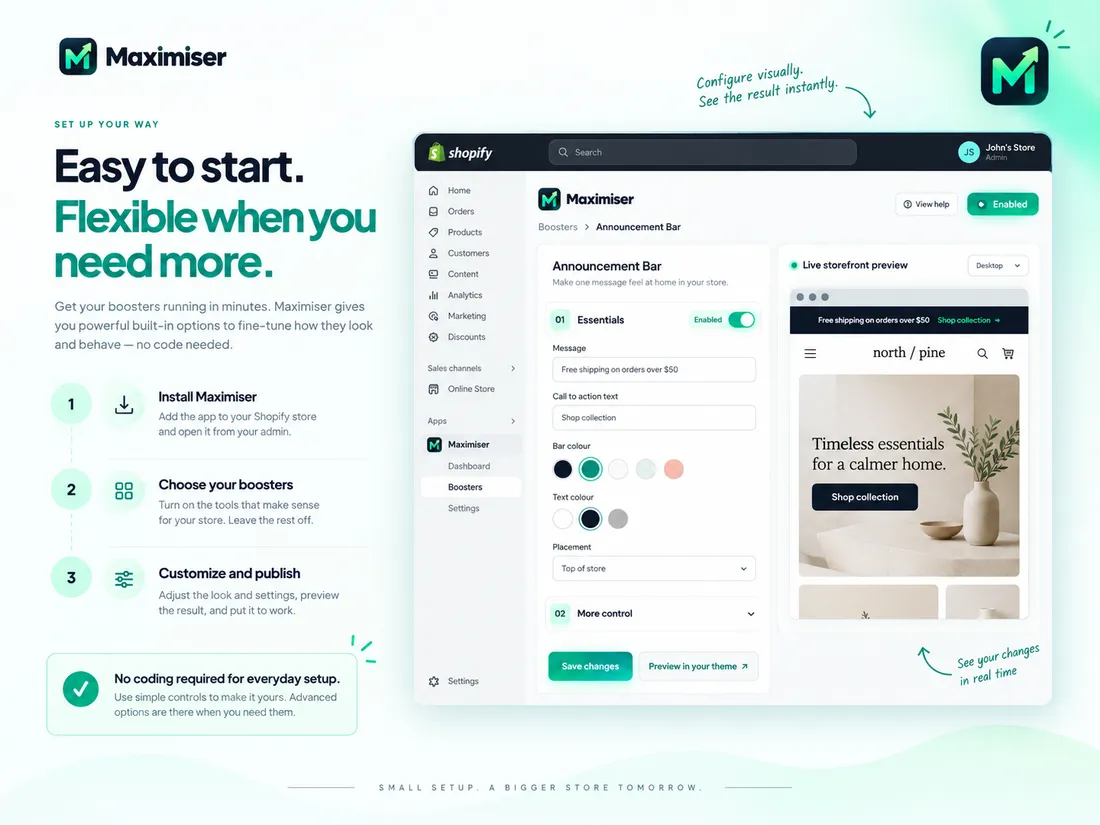
Get your boosters running without touching code. Use simple built-in controls to make them fit your store, with more options available whenever you want extra control.
Add Maximiser to your Shopify store and open it directly from your admin.
Turn on the tools that make sense for your store. Leave the rest off.
Adjust the content, colours and settings, then preview the result before publishing.
No coding required.Use simple controls to get started. More advanced options are there when you need them.
WHY ONE APP?
Every extra app can add another script, storefront integration and layer to manage. Maximiser brings 11+ conversion boosters together in one integrated toolkit — helping you keep your setup simpler, more consistent and lighter than stacking 6–7 separate apps for the same jobs.
MULTIPLE SEPARATE APPS
Multiple apps. More moving parts.
ONE INTEGRATED TOOLKIT
One app. One integrated toolkit.

11+ boosters in one place
Replace several separate app interfaces with one place to manage your conversion tools.
One integrated toolkit means fewer separate apps, scripts and storefront integrations to manage.
That can help keep your store cleaner and more efficient than stacking 6–7 independent apps for the same jobs.Set up, customize and review your boosters from the same app.
Keep your boosters, dashboard and recommendations together instead of spreading them across different apps.
Illustrative workflow comparison. No measured speed or performance improvement is claimed; actual storefront impact depends on the apps and theme in use.
QUESTIONS? LET’S CLEAR THINGS UP.
Maximiser is still in development, so we’ve answered the questions that matter most before launch.
Maximiser brings multiple Shopify conversion tools together in one app. Instead of installing separate apps for things like announcement bars, back-in-stock alerts, cart tools or delivery messages, you can manage your boosters from one Maximiser workspace.
Maximiser currently includes 11+ boosters: Announcement Bar, Estimated Delivery, Real Stock Scarcity, Product Badges, Complementary Products, Spending Tiers, Smart Popup, Recently Viewed, Back in Stock, Sticky Add to Cart and Cart Drawer. We’re continuing to add and refine tools as Maximiser grows.
No. Everyday setup is handled through simple controls inside Maximiser. Choose a booster, adjust its settings, preview the result and publish when you’re ready. Some storefront tools may require the usual Shopify app embed or app block to be enabled, but normal setup does not require writing code.
Yes. Depending on the booster, you can adjust things like content, colours, placement and behaviour. The available options vary by tool, so you get useful control without turning everyday setup into a complicated design project.
Because one integrated toolkit is simpler to manage than a stack of separate apps. With 6–7 different apps, you can end up with several dashboards, different settings, separate subscriptions, multiple storefront integrations and more things to keep track of. Maximiser brings related conversion tools together in one place, with one consistent setup, one dashboard and one way to manage your boosters. It also keeps your storefront stack leaner by reducing the number of separate apps, scripts and integrations that need to load and run on your store.
Maximiser is designed to be lighter than running 6–7 separate apps for the same jobs. Separate apps often bring their own scripts, assets and storefront integrations. With Maximiser, those conversion tools are built as one integrated toolkit instead of being bolted together from multiple independent apps. That means fewer separate app layers for your store to load and manage, which helps keep the storefront cleaner and faster.
Yes. Maximiser is designed as an embedded Shopify app, so its main workspace lives directly inside your Shopify admin. You can manage your boosters, settings and dashboard without learning a completely separate external platform.
The dashboard brings your booster activity into one place. You can see what’s active, review useful store activity, keep an eye on how your tools are performing and spot areas worth improving. Maximiser also includes practical recommendations to help point you toward useful next steps.
Not yet. Maximiser is currently in development, and the public launch date hasn’t been finalized. Join early access to receive launch updates and be among the first people we contact when testing or launch access becomes available.
Early access is for launch updates and invitations when Maximiser is ready for early users. Joining the list won’t install anything on your Shopify store or change your current setup.

BE FIRST TO KNOW
Join early access for launch updates and invitations when Maximiser is ready for early users.